

07-07-2026
Once you've submitted your education loan application through EduLend, the wait begins, and not knowing where your application stands is one of the most frustrating parts of the process.
This guide explains exactly how to check your application status on the EduLend dashboard, what each status stage means, how long each stage typically takes, and what to do if your application appears stuck or delayed.
Education loan timelines are tighter than most people expect. A visa appointment, a college fee deadline, or an admission acceptance window can all hinge on whether your loan sanction letter arrives in time.
Knowing your application status in real time lets you:
Reactive follow-up, calling after a deadline passes, is far less effective than proactive tracking. The EduLend dashboard is designed to give you that visibility without requiring multiple calls to lenders or advisors.
If you've applied for an education loan through EduLend, you have an account on the EduLend platform.
To access your dashboard:
If you're logging in for the first time after your advisor submitted your application:
Your account may have been created on your behalf. Use the Forgot Password option with your registered email or mobile number to set up your login credentials.
If you can't access your account: Contact EduLend support directly (see the How to Contact EduLend Support section below). Do not create a duplicate account. It can cause tracking issues with your application file.
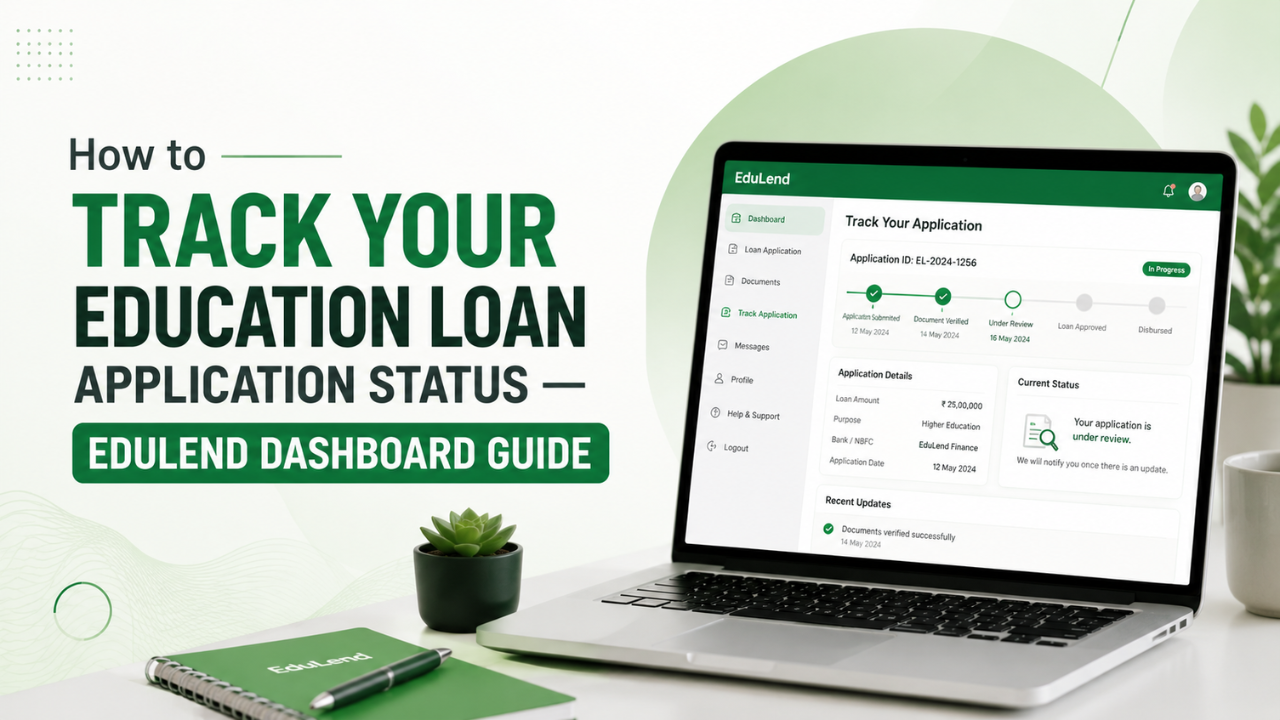
Your EduLend dashboard displays your application as it moves through a series of stages, from submission to disbursement. Each stage has a status label and, where applicable, a pending action or required document.
Here's what the full journey looks like:
Application Submitted → Document Verification → Lender Review → Sanction Letter Issued → Loan Disbursed
Each stage is described in detail below.
What it means: Your application has been received by EduLend, and your advisor has logged it into the system. Basic details, including the student profile, co-applicant details, target institution, and loan amount, have been captured.
What happens next: Your assigned EduLend advisor reviews the application, assesses your profile against eligible lenders, and prepares your file for document submission.
Typical duration: 1–2 business days
What you should do:
What it means: Your EduLend advisor and/or the lender is reviewing the documents you've submitted. This stage involves checking for completeness, clarity, and consistency, not yet making a credit decision.
Common checks at this stage:
Typical duration: 2–5 business days for complete applications. Incomplete or unclear documents extend this significantly.
What you should do:
Most delays at this stage are avoidable. A clear scan, a complete ITR, and matching names across documents will move your file forward in 2–3 days. Partially submitted documents keep applications stuck for weeks.
What it means: Your completed file has been submitted to the lender (bank or NBFC) for credit assessment. The lender is now evaluating your co-applicant's income, CIBIL score, collateral (if applicable), institution eligibility, and loan amount.
What happens during lender review:
Typical duration:
What you should do:
What it means: The lender has approved your loan. A formal sanction letter has been issued, specifying the loan amount, interest rate, tenure, moratorium period, and any conditions attached to the sanction.
Your dashboard will show: The sanction letter as a downloadable document.
What to do immediately:
What happens next: The loan agreement is executed, signed by the borrower and co-applicant at the lender's branch (or via digital signature where supported). For secured loans, mortgage documentation is executed at this stage.
Typical duration from sanction to agreement execution: 3–7 business days (depends on your availability for the branch visit).
What it means: Loan funds have been released, either to the institution's account (tuition fees) or to your account (living expenses), depending on the loan structure.
Your dashboard will show: Disbursement confirmation with the amount and date.
Important: Education loans are disbursed in stages, not in full at the beginning. The first disbursement typically covers the first semester or year's tuition. Subsequent disbursements require a fresh fee demand letter from the institution for each cycle.
For overseas loans: Allow 3–7 additional business days for international wire transfers to be credited to the university's account. Confirm with the university's finance office that the payment has been received before assuming it is complete.
Annual disbursement reminder: Each year, you must proactively submit the next year's fee demand letter to your lender and request disbursement. This does not happen automatically. Use the EduLend dashboard to track disbursement requests and their status.
If your application has remained at the same stage for longer than the typical duration listed above, here's how to respond.
The most common reason for an application remaining at the Document Verification stage is a missing document that the lender is waiting for. Check whether there's an open document request on your dashboard before escalating.
Your assigned advisor is your first point of contact. They have visibility into the lender's internal queue and can follow up on your behalf more effectively than a direct call to the lender.
If you have a visa appointment, college fee deadline, or admission acceptance deadline, communicate that date explicitly to your advisor. Escalation requests with a specific external deadline receive higher priority.
During peak admission seasons (June–August and December–January), lender review queues are longer. NBFCs typically process applications faster, while PSU bank branches in busy areas can run 3–4 weeks behind. Your advisor can tell you whether the delay is systemic or specific to your file.
If your advisor is unresponsive or the application has genuinely stalled beyond the expected timelines, use EduLend's support channels to escalate the issue (see below).
Most application holds fall into one of these categories.
If your application is on hold because of a CIBIL or eligibility issue, your EduLend advisor should present options, either addressing the specific issue or switching to a lender with a different risk appetite.
Every application is assigned an advisor. Their name and contact number are displayed on your dashboard under "Your Advisor." This is the fastest route for application-specific queries.
For general queries, login issues, or if your advisor is unavailable:
Tracking your application isn't about anxiety. It's about staying in control of a process with real deadlines attached. The EduLend dashboard gives you visibility at every stage, and your assigned advisor is the fastest route to resolving anything that's unclear or stuck.
The single most effective thing you can do to keep your application moving is to respond to document requests immediately. Most delays are document-driven, and a 24-hour turnaround on a pending document request can be the difference between getting a sanction letter in time for your visa appointment and missing it.
Log in, check your status, and keep your advisor informed of any deadlines they should know about.
Questions about your EduLend application? Log in to your EduLend dashboard or contact your advisor directly. For new applications or general loan guidance, our advisors are available for free consultations.
Your dashboard shows the lender your application has been submitted to under the Application Details section. If you don't see this, ask your assigned advisor. They will confirm the lender and the current stage within the lender's process.
Yes, but only before the lender has conducted a CIBIL pull. Once the lender has pulled your co-applicant's credit report, switching may result in an additional inquiry, which can marginally lower the CIBIL score. Your advisor can guide you on whether a switch is advisable based on your specific situation.
Check your dashboard for any open document requests first. If there are none and the application hasn't moved, contact your EduLend advisor directly and ask for a specific status update with a reason for the delay. If you have an external deadline, such as a visa appointment or fee payment, communicate it clearly.
A lower sanction amount typically reflects the lender's assessment of the co-applicant's income-to-debt ratio or collateral value. Options include providing additional collateral, adding a second co-applicant, switching to an NBFC with a higher unsecured ceiling, or combining the loan with a top-up from an international lender. Discuss the specific shortfall with your advisor.
Yes. Most lenders set a validity period on the sanction letter, typically 3–6 months. If you don't execute the loan agreement within this period, the sanction lapses and you may need to reapply. Check the validity date on your sanction letter and complete the agreement execution within the stated period.
If your application is managed through EduLend, always route document submissions through your EduLend advisor, not directly to the lender. This ensures your file remains complete and traceable within the EduLend system. Direct submissions to the lender can create version control issues and slow down your application.